Schools Syllabus Management Software
Allot Staffs for each subject based on class and division
Schedule the period for completing the syllabus for each staff

Features :
- We can view the Syllabus details report which includes the details like Subject Name along with Staff Name who is handling that subject and also the syllabus time schedule
- We can View the details like whether the staff has completed the syllabus within the scheduled period or later
- We can enter syllabus book information such as Book Name, Author Name, Version, Publisher Name and Publish Year for each subject
- We can Upload Syllabus Book Information as an image, Word document or notepad files
- We can enter syllabus completion date and also remarks regarding the syllabus completion
- We can view the Syllabus Book Information details for each subject
- We can download the uploaded syllabus book information files by selecting their respective class and division
Get Started
Take a demo; get a quote or just more information
or, Call Us
+914224371212 +914222446043
For Product Enquiry (New Clients) :
+919360039678 +919360049678
For Software Support (Existing Clients) :
+919489069678
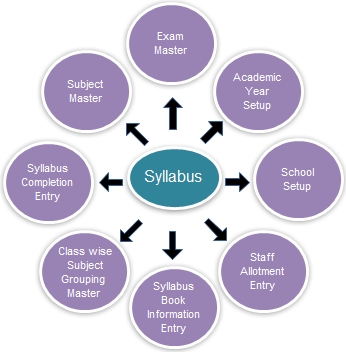
- Enter Subject Names in Subject Master screen.
- In Class wise Subject Grouping Master screen, Select Class & Division and then select the subjects of that class. This screen helps you to group the subjects under the selected class.
- Select class & division in Syllabus Book Information Entry screen and then click on Load button. Now the Subjects of that particular class will be listed.
- Enter the Book Name, Author Name and publisher Name for the subject. You can also enter the Publish Year and Remarks which are optional.
- In Syllabus Book Information Entry, you can also upload a file for each subject which can be an image, a word document or a notepad file.
- Select class & division in Staff Allotment Entry and then click on Load button. Now the Subjects of the class will be displayed. You can select the staff for each subject and also set the time period for the syllabus completion.
- In Syllabus completion entry, the staffs can enter the syllabus completion date for each subject.
- Now the students can download the uploaded syllabus documents and the syllabus duration and completion dates can be viewed.